





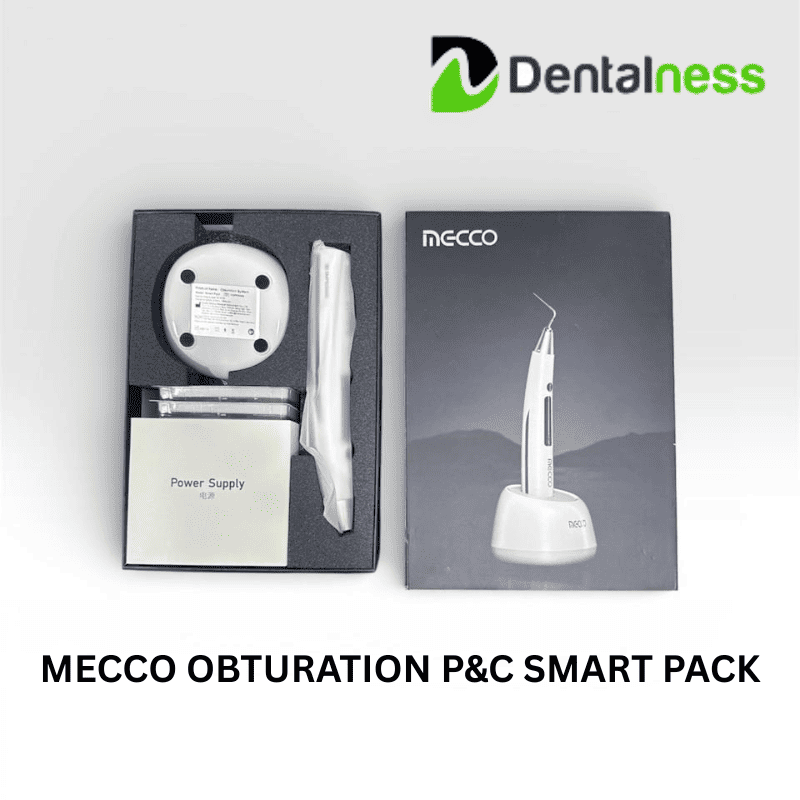
MECCO OBTURATION P&C SMART PACK
₹24,998.33
₹14,999.00Save 40%
Tax included
The MECCO Dentalness Obturation P&C Smart Pack is a compact and efficient cordless obturation system designed for precise and controlled root canal filling. It offers consistent heat performance, ergonomic handling, and reliable results—making endodontic procedures faster, safer, and more comfortable for both dentist and patient.
Brand : Mecco
- The display can be set to both right and left sides, to meet the needs of both left-hander and right-hander.
- Cordless design for Obturation System Instrument effectively broadens the operation space.
- Sensitive temperature control, simple display, and convenient operation.
- There are five preset temperatures options available: 150°C, 160°C, 180°C, 200°C, 230°C. Press temperature setting button to set suitable working temperature.
- Portable and mobile RF communications equipment may affect the performance of equipment, use of equipment should be avoided strong electromagnetic interference, and do not closer to mobile phone, microwave oven, etc.
- Use of equipment adjacent to or stacked with other equipment should be avoided because it could result in improper operation. If such use is necessary, this equipment and the other equipment should be observed to verify that they are operating normally.
- Except for the cables sold by manufacturers of as spare parts of internal components, the use of accessories and cables other than those specified or provided by the manufacturer may result in increased electromagnetic emissions or decreased electromagnetic immunity of this equipment and result in improper operation.
- Use of accessories, transducers and cables other than those specified or provided by the manufacturer together with equipment could result in increased electromagnetic emissions or decreased electromagnetic immunity of this equipment and result in improper operation.
- Guidance and manufacturer's declaration -electromagnetic emissions and Immunity.
| Category | Item | Specification |
|---|---|---|
| Sizes | Obduration System Instrument | Φ25.02 × 175 mm |
| Weight | Charging base | 95 g |
| Weight | Obduration System Instrument | 150 g |
| Dimensions | Charging base | 82 mm × 82 mm × 62 mm |
| No. | Accessories | Quantities |
|---|---|---|
| 1 | Main unit | 1 |
| 2 | Battery | 1 |
| 3 | Charging base | 1 |
| 4 | Power adapter | 1 |
| 5 | Tips(4-straight and 1-ball burnisher) | 5 |
| 6 | Heat insulation sleeve | 5 |
| 7 | Instruction manual | 1 |
| 8 | Certificate of quality | 1 |
-
- According to the situation of patient, select suitable tip and install it. When installing the tip, chose a suitable angle to install the tip.
- After pressing the "ON/OFF" button, the display screen of Obturation System Instrument lights up and display the mode,preheating temperature and power status.
- According to the actual situation, lightly press the temperature setting button, and select suitable preheating a temperature as per the instruction on display screen.
- During operation, lightly press the heating button so as to heat up to the preset temperature, soften and pressurizing the gutta-percha with careful, continuous and stable motion.
Note: The continuous heating time on gutta-percha cannot exceed 4s, or there would be risk of scalding.
After Operation
-
- After use, please clean, disinfect, and sterilize the tip. For detailed instructions, refer to Chapter 6.1.
Working Modes
-
- The device offers 5 working modes (M1-M5). Press the ON/OFF button briefly to switch between modes.
Fixed Temperature & Time Modes:
1.M1 Mode: 160° C, working time: 25 seconds
2.M2 Mode: 200° C, working time: 10 seconds
3.M3 Mode: 230° C, working time: 10 seconds
Customizable Temperature & Time Modes:
4.M4 Mode: Temperature adjustable from 150° C to 230° C, working time adjustable from 5 to 10 seconds
5.M5 Mode: Temperature adjustable from 150° C to 230° C, working time adjustable from 5 to 10 seconds
How to Set Temperature and Time (for M4 and M5):
- In standby mode, press ON/OFF to switch to M4 or M5.
- Long press the heating button to enter temperature setting mode.
- Short press the heating button to adjust the temperature.
- Short press the ON/OFF button again to enter the time setting mode.
Function Settings
In the shutdown state, long press both the heating button and the ON/OFF button to enter the function setting interface.
Setting Instructions:
- Short press the ON/OFF button to cycle through parameter options
- Short press the heating button to adjust values.
- Continue pressing the ON/OFF button to enter the standby interface and save your settings.
Configurable Functions:
1] Set for left-handed or right-handed use;
2] Adjust the buzzer volume (3 levels; default is medium);
3] Set the auto shut-off time (2-10 minutes; default is 5 minutes);
4] Set the return-to-standby time after preset temperature (default is 50 seconds).
1 Year
AVAILABLE OFFERS
| Quantity | Unit discount | You Save |
|---|---|---|
| 2 | 41% | Up to ₹20,498.63 |
| 5 | 42% | Up to ₹52,496.50 |


Dentalness Benefits

Free Shipping over order of 3000

Hassle Free Cancellation

10 Days Replacement

100% Genuine Products
The MECCO Dentalness Obturation P&C Smart Pack is a compact and efficient cordless obturation system designed for precise and controlled root canal filling. It offers consistent heat performance, ergonomic handling, and reliable results—making endodontic procedures faster, safer, and more comfortable for both dentist and patient.